Removing Barriers to
New Rider Adoption
in the NYC Ferry App
The NYC Ferry app was failing to convert potential riders before they ever boarded. A self-initiated usability study using think-aloud protocol and emotional journey mapping across three core tasks revealed significant navigation barriers pushing new users toward other transit options.
Role
Timeline
Methods
Deliverables
01 · The Challenge
Lost at
the first screen
4 of 5
participants failed to map a route — all four said they'd switch to another transit option
The NYC Ferry connects New Yorkers to parts of the city that are difficult to reach through other transit. The app, though, which was meant to provide riders with information was failing to fulfill the most desired function: mapping the user route.
I had a difficult time planning a route on multiple occasions using the ferry app, and was finding it was not able to answer my main question: Can the ferry get me where I'm going?
"At this point, I think I would give up and then find the answers on Google because I am feeling upset and defeated."
— P1, Usability Session
02 · Research Design
From mapping mental models
to user focused Insights
Study Sample
People with low to no understanding of the ferry network between the ages of 25 to 35 years old. Each session opened with generative questions before participants touched the app at all — establishing their mental model before the app could influence it. The usability test then revealed where expectations and actual app delivery diverged.
Method 01
Generative Pre-Task Interviews
Before participants touched the app, I asked why they'd consider using the ferry and what they expected the app to do. This established their mental model and gave me a baseline — so I could connect what users wanted directly to what they experienced.
Method 02
Think-Aloud Testing
Verbalization throughout each task. Participants narrated their expectations before each interaction and their interpretation after. Probing questions focused on moments of hesitation, unexpected outcomes, and vocabulary mismatch.
Method 03
Emotional Journey Mapping
After each session, I charted each participant's experience across all three tasks — action taken, logic behind it, and emotion at each step. All five participants showed a strikingly uniform arc, which led to a single composite map rather than five individual ones.
Core Tasks Tested
Find a route from Upper West Side to IKEA
Test route discovery, map orientation, and stop selection logic. This was confirmed by participants as the main function the participants were wanting from the app.
Purchase a ticket for the trip
Tests ticketing flow, option selection, and purchase completion — the conversion point for any rider.
Find Departure Times
Tests schedule navigation and terminal name legibility — the information layer most users assume the app will handle automatically.
03 · User Persona
Meet Rachel —
the rider the app is losing
Rachel is a user persona based on the pre-test generative interviews conducted. All of the aspects of Rachel's persona is based on actual responses from the five users to these three questions: Why use the ferry over other forms of transit? Why would you keep the ferry app on your phone, if you were to keep it? List three main functions you expect this app to perform.
Rachel
Social copywriter · Manhattan · 27–32 · Regular NYC transit user
Occasional ferry rider — uses it for leisure and to reach subway-inaccessible neighborhoods
Tools They Use Today
"At this point, I think I would give up and then find the answers on Google because I am feeling upset and defeated."
— Rachel, Route Mapping Task
Goals
Know quickly if the ferry can get her to a destination — before committing to it
Reach neighborhoods the subway doesn't serve well (Red Hook, Greenpoint)
Buy tickets in-app rather than at the terminal machine
Use the ferry casually for views and city exploration
Pain Points
App can't answer "can the ferry get me there?" — redirects to Apple Maps with no ferry route shown
Has to leave the app and use Google Maps mid-task to plan a single trip
Terminal names like "St. George" and "Stuyvesant Cove" don't map to any neighborhood she knows
Live map home screen reads as confusing and hard to interpret on first open
Needs
A routing flow that goes origin → ferry stop → destination as a single trip
Terminal labels that include neighborhood or borough context (e.g. "St. George (Staten Island)")
The simplified routes map as the default home screen — not the live map
Clear routing-to-ticketing handoff once a route is confirmed
Job to Be Done
Who: Rachel, a Manhattan-based social copywriter with a desire to explore the city Needs: to quickly find out whether the ferry can get her to a specific destination In order to: use the ferry to reach parts of the city the subway can't take her, without having to piece together a route across multiple apps.
Session Evidence
Moments where the app lost participants
These screenshots were taken during live sessions. Each one marks a moment where a participant lost confidence — where the app's response pushed them toward giving up rather than forward. Hover each to see what it meant.
Hover to expand
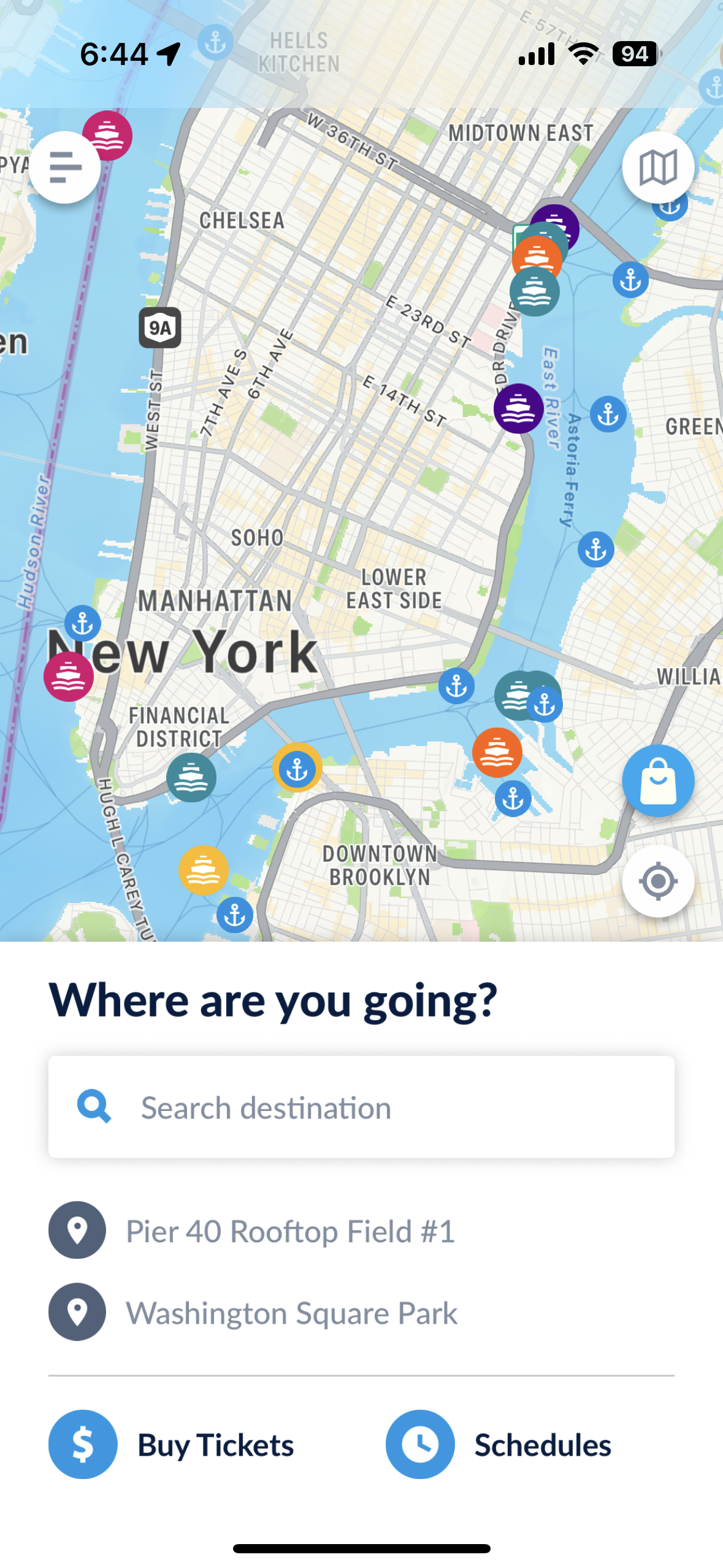
Cluttered homepage
Task 1 · Map a Route
What participants were trying to do
Find out whether the ferry could get them to a specific destination — IKEA in Red Hook. They needed a clear entry point to input a starting location and destination to confirm a route existed.
What they encountered
The home screen presented a live map, search bar, recent locations, and two action buttons simultaneously. All five participants described not knowing where to begin. Several attempted the search bar but were unclear whether it was for routing or ticket purchase.
Hover to expand
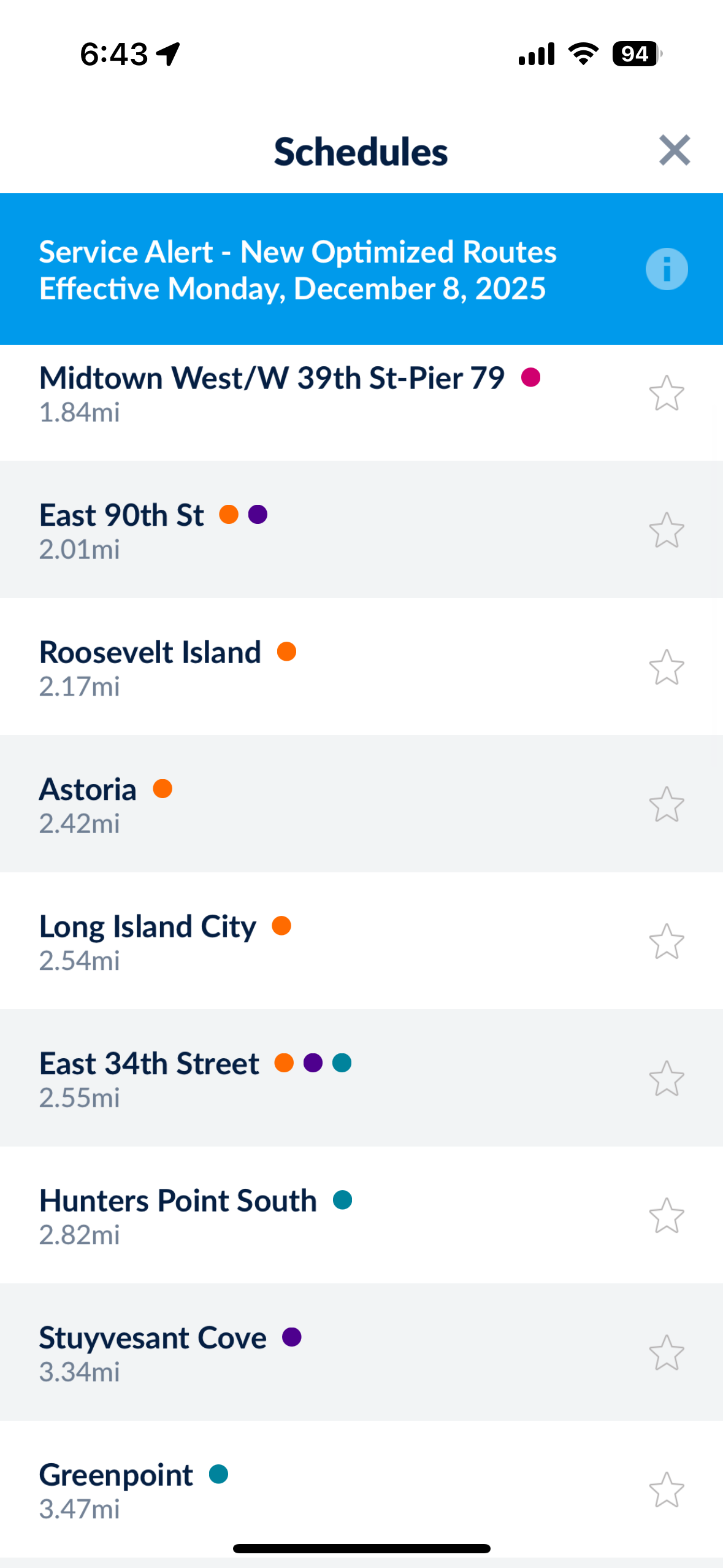
Schedules list
Task 3 · Find Departure Times
What participants were trying to do
Find when the next ferry departed from a specific pier. They expected to see a schedule organized by route or stop — something they could scan quickly to find their option.
What they encountered
Tapping "Schedules" produced an undifferentiated list of all 22 stops sorted by distance, with no routes, no filtering, and no indication of which stops were connected. Most participants scanned briefly and abandoned the screen within seconds.
Hover to expand
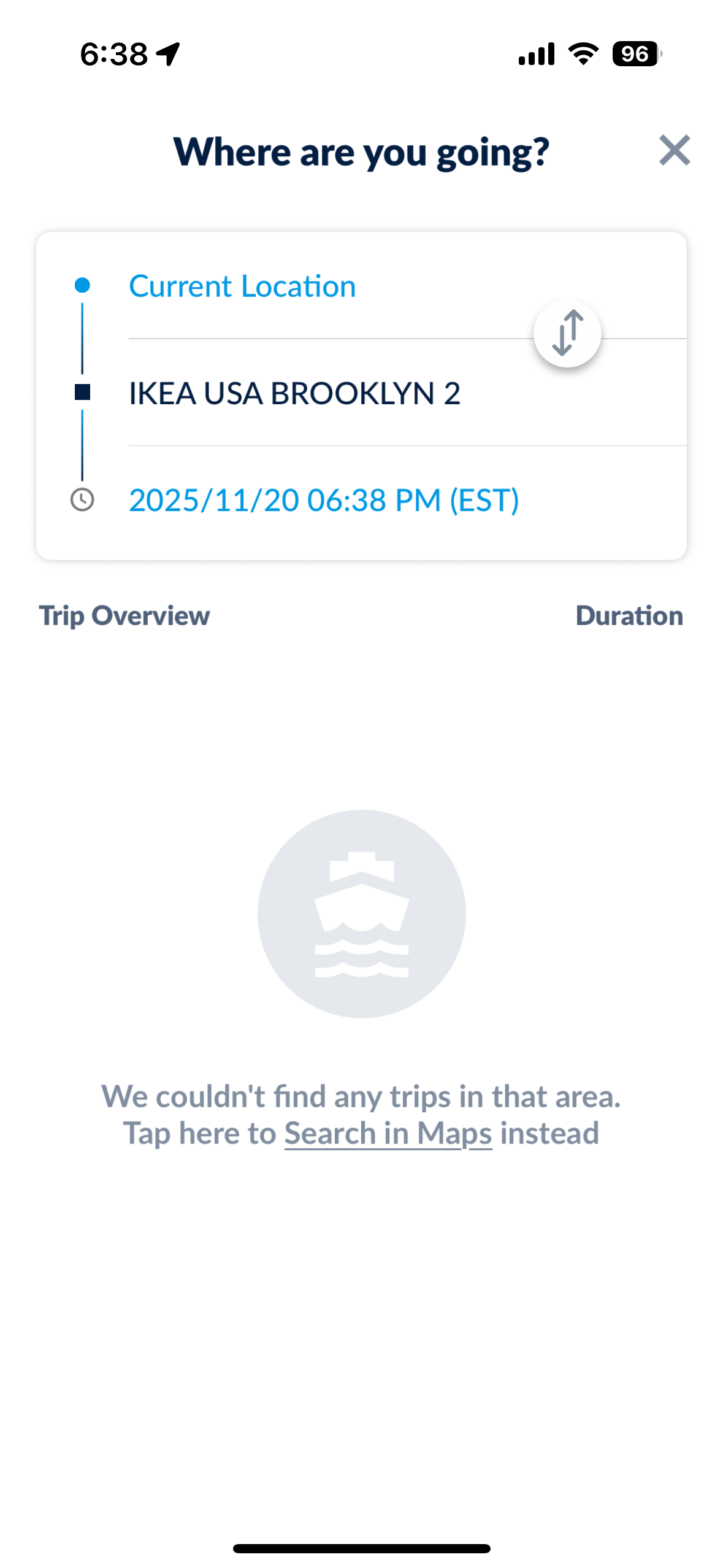
No trips found — attempt 1
Task 1 · Map a Route
What participants were trying to do
Confirm whether the ferry could get them from their current location to IKEA USA Brooklyn 2 — their actual intended destination, not a ferry terminal name.
What they encountered
The app returned "We couldn't find any trips in that area" — no explanation of why the search failed, no nearest alternative stop suggested, and no indication that a ferry route to that area actually existed. The only option offered was to leave the app entirely.
Hover to expand
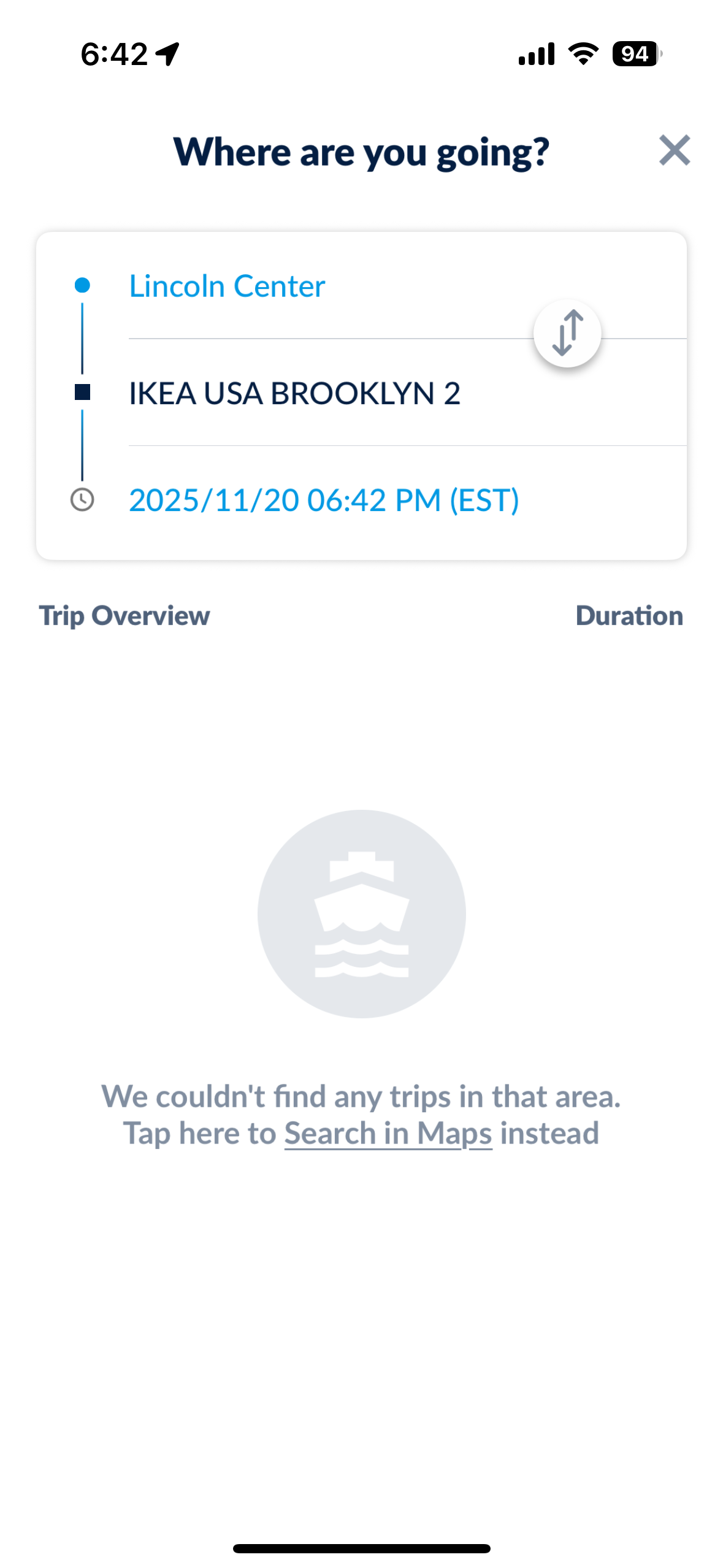
No trips found — attempt 2
Task 1 · Map a Route
What participants were trying to do
Route from Lincoln Center to the same destination, testing a different starting point to see if the result would change.
What they encountered
The identical empty state. The app requires a ferry terminal as the destination — not a street address — but this constraint is never communicated. Both participants concluded the ferry did not serve their destination, when in fact it did.
Hover to expand
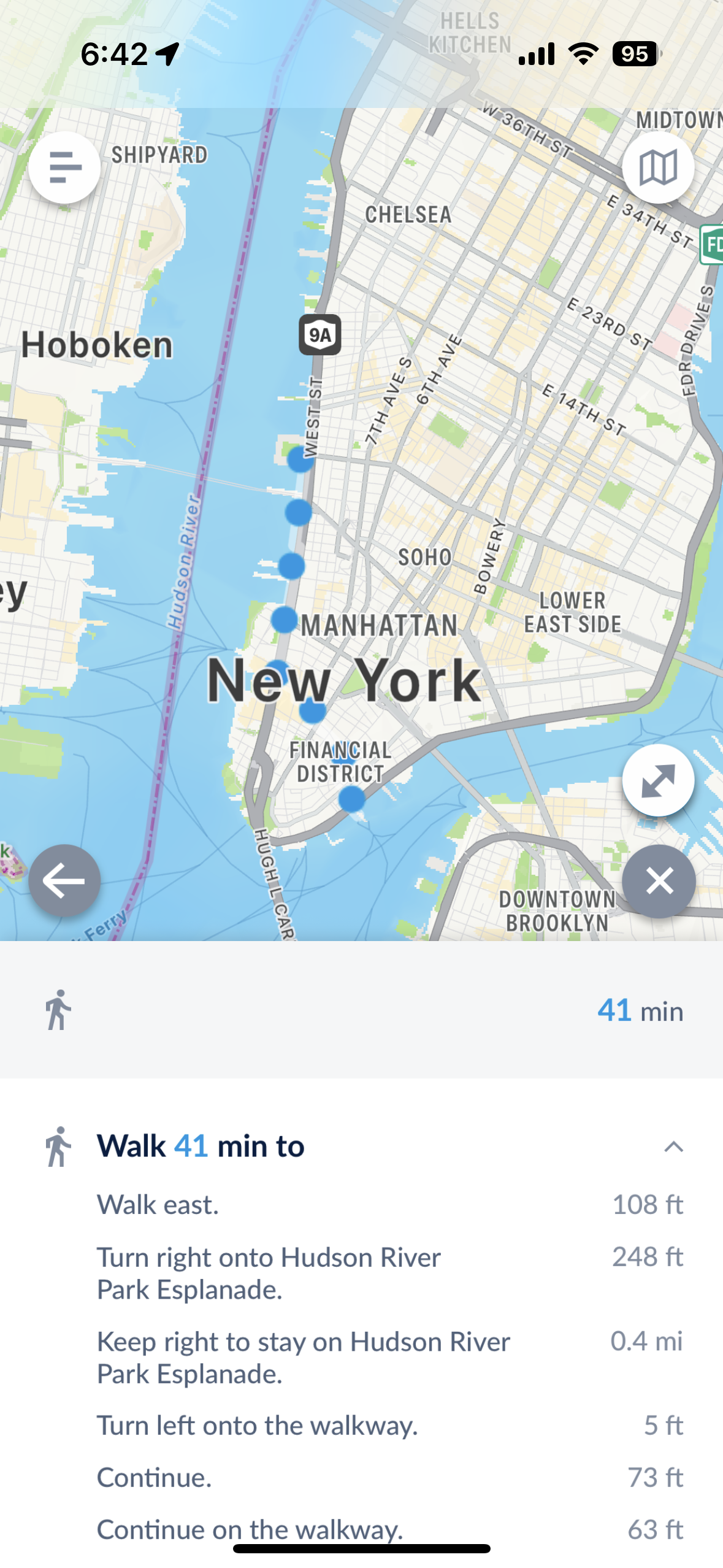
Ferry app walking directions
Task 1 · Map a Route
What participants were trying to do
Route to a ferry stop from their current location using the ferry app's built-in routing feature.
What they encountered
The ferry app's own routing returned only walking directions to the Ferry Stop, no bus or subway routing. This forced users to leave the app to find faster methods to get to ferry access.
Hover to expand
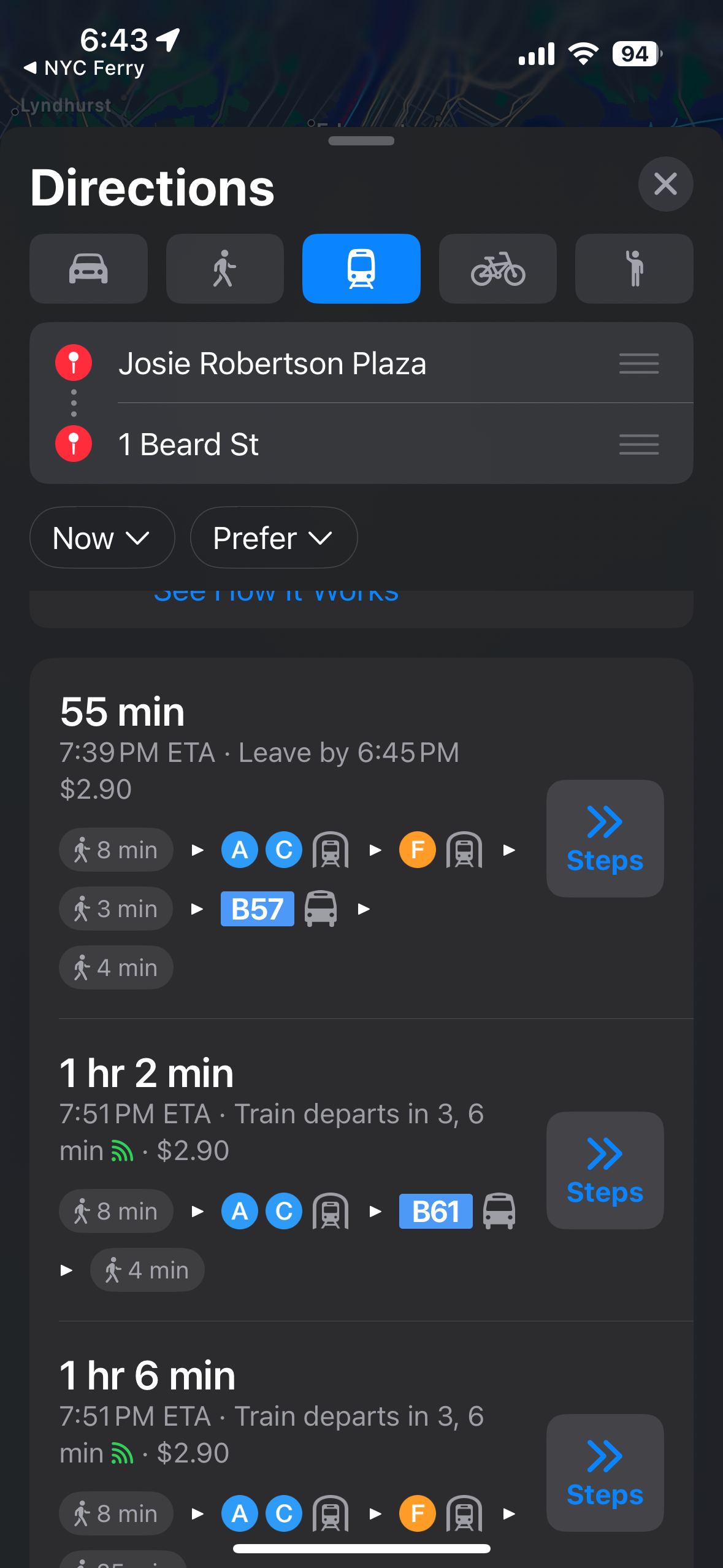
No ferry in Apple Maps
Task 1 · Map a Route — after leaving the ferry app
What participants were trying to do
After the ferry app returned a "No routes" result, participants followed the app's suggestion to open Apple Maps, switching to transit mode to find a public transit option.
What they encountered
Switching to Apple Maps transit from the ferry app's "No routes" page surfaced only subway options — despite a ferry route existing for this exact trip. Participants assumed the ferry was not running that day or simply didn't serve their destination.
04 · Key Findings
Friction clustered at the same three moments
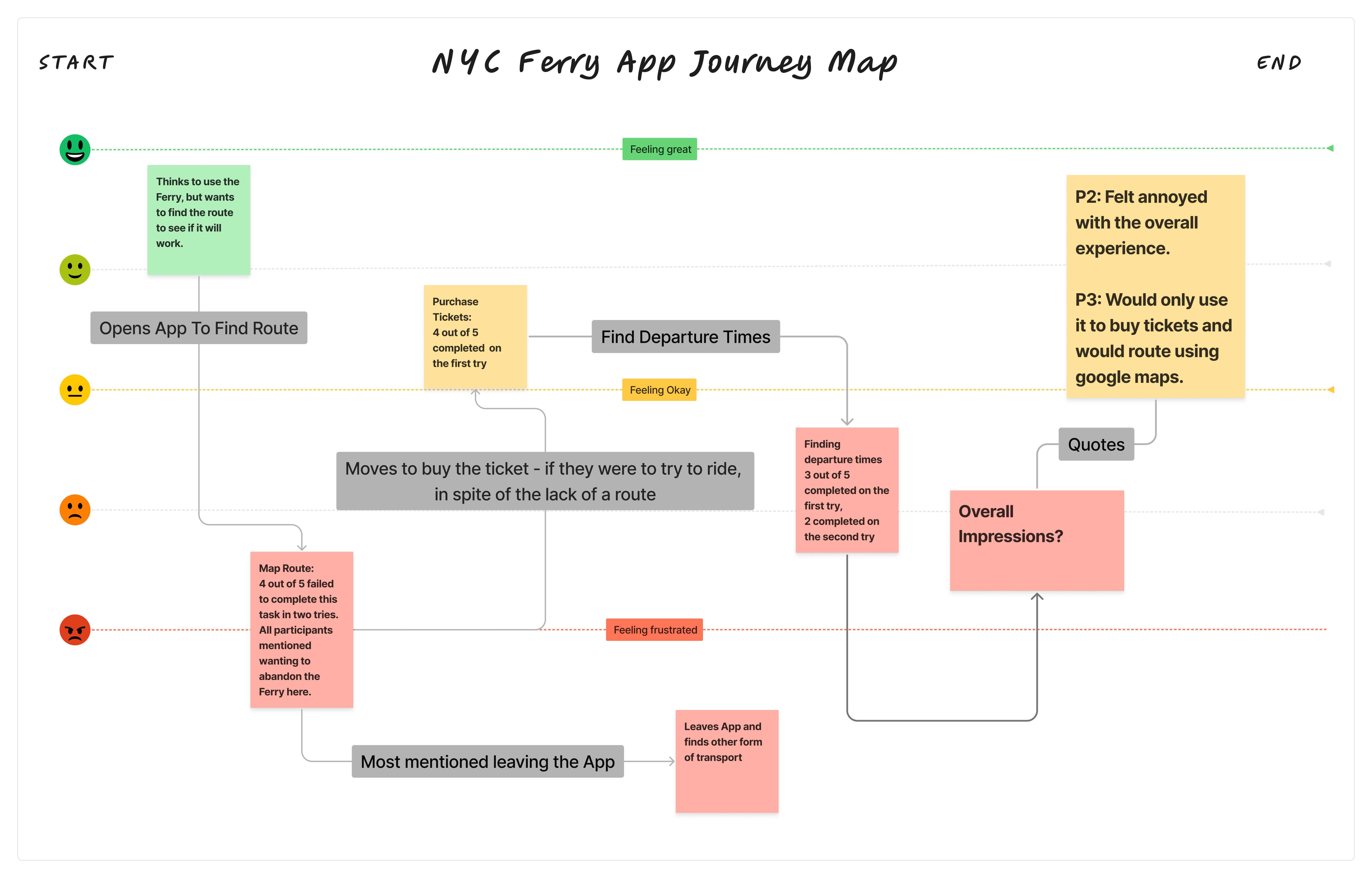
Emotional Journey Map — Composite across all 5 sessions
01
Route mapping breaks before it begins
The app treats a ferry stop as the destination; however, users were often looking to get to IKEA in Red Hook, not to the ferry stop. Within the app, it will try to redirect you to Apple Maps, however it will not show you the ferry route from there, even when one exists. The participants interpreted the absence of a route as the absence of ferry service.
Consequence
This isn't a usability inconvenience — it's a rider acquisition failure. Routing failure was the single issue where task failure cascaded into participants rejecting the ferry entirely, not just the app.
Participant Quotes
"The app is making me do a lot of work in order to get a route."
"It would be nice if they would route me with other public transit to where the ferry starts."
02
The home screen buries the most useful information
Every participant described the home screen as overwhelming or confusing on first open. The live map — the app's primary interface — was rated as less useful than the simplified routes map hidden in a corner of the screen. The live map requires users to already know the ferry network to interpret it. The participants reported not knowing where to start.
Consequence
New users — the people most likely to benefit from routing guidance — are the least equipped to interpret the default interface. The app's most useful feature for new riders is effectively invisible to the people who need it most.
Participant Quote
"It took me a good number of clicks to find these times. I think the homepage is just so cluttered by the map. And that map is not very clear."
03
Ferry terminal names create friction for anyone who doesn't already know them
3 out of 5 participants couldn't confirm they had found the right ferry terminal even after completing the task. Labels like "St. George" and "Stuyvesant Cove" were unfamiliar across the group — including among New Yorkers who had lived in the city for years. The ferry terminal names don't correlate to neighborhood identities that users navigate by.
Consequence
Ambiguous terminal names erode confidence at the exact moment a user should feel certain — right before they buy a ticket or board. A user who hesitates at terminal selection is a user who may not complete the purchase.
Participant Quote
"I am not sure if St. George is in Staten Island, so it would be nice if that was included in the stop name."
05 · Prototype Response
Redesigning the three friction points
Findings informed a clickable Figma prototype redesigning the app's core routing and scheduling flows — one solution direction per insight, each tied directly to the observed failure mode.
Prototype Change 01
Destination-first route discovery
Replace the live map home screen with the simplified routes map, which participants consistently found more useful and less disorienting. Integrate routing that guides users from origin to ferry stop, then from the ferry stop to their final destination — as a single continuous trip. When redirecting to an external map, pass the ferry route as context so Apple Maps surfaces ferry options by default.
Prototype Change 02
Simplified routes map as default home screen
Set the simplified routes map as the default home screen, with the live map accessible as a secondary view. Reduce the visual weight of the search/destination bar, which consistently confused users about expected input. Surface a "Plan a Trip" entry point prominently so the path from opening the app to finding a route requires fewer exploratory clicks.
Prototype Change 03
Neighborhood-first terminal labels
Add neighborhood or borough context to every ferry terminal label (e.g., "St. George (Staten Island)", "Stuyvesant Cove (East Village)"). Include nearby landmarks or cross-streets in stop detail views. Consider a user-controlled toggle between terminal names and neighborhood names for different use cases.
Study Deliverables
Unified Journey Map
Composite emotional arc across all five sessions, charting the consistent trajectory from curiosity → frustration → abandonment
User Persona
Rachel — a Manhattan-based social copywriter who wants to explore the city but needs clear routing to do it
Usability Report
Task success rate across five participants, mapped to severity and design opportunity by feature area
Prototype
Clickable redesign illustrating a route-first home screen where clicking a terminal highlights routes and connection points
Figma Prototype
Interactive prototype of the redesigned routing and scheduling flows
06 · Reflection
Designing Inclusively
for new and experienced riders
The generative interviews to start the session ended up being a great way to understand each user's motivation at the start, then to compare those stated motivations with task success rates. I felt like the motivations to start actually ended up inadvertently validating the task list, even though that wasn't planned.
Something that surprised me in synthesis was findings about the neighborhood tags. I had not thought about how specific the ferry stop names can be and how unrecognizable they might be for people unfamiliar with the ferry system. This wasn't part of the test, it was just a finding from the generative interviews, and I think a really important one.
What I'd do differently
-
→
Include a standardized usability measure (SUS or similar) to quantify findings alongside the qualitative data — a score would have made the case for redesign stronger in any stakeholder conversation.
-
→
Frame usability tasks to be more broad. Something like "using the ferry app you're trying to get to IKEA" more closely mirrors real-world behavior.
Follow-up research I'd recommend
-
→
An A/B test of redesigned features targeting both new users and current riders, using the same task set to properly attribute improvement to design changes.
-
→
User interviews with current frequent ferry riders to understand how they use the app and which features they'd prioritize.
-
→
A broader study examining whether the app's usability challenges affect new rider acquisition rates across other population segments.
Contact Information
Want to talk? Good news:there's no co-pay anymore.
thornton.coen@gmail.com